Your tracker, but it works.

RCMS keeps every candidate in one place, from the first screening call to a signed offer. Your data stays in an ordinary Excel file on your own PC. No cloud, no account, no subscription.

A sample pipeline: five invented candidates and where each one stands.
CANDIDATEPOSITIONSTAGECV
Asha RaoNetwork Engineer (Goa)Selectedasha-rao.pdf
Vikram NairQA Lead (Bengaluru)On holdvikram-nair.pdf
Meera IyerNetwork Engineer (Hyd)Round 2meera-iyer.pdf
Rohit DesaiData Analyst (Delhi)Screenedrohit-desai.pdf
Sara MenonQA Lead (Bengaluru)Joinedsara-menon.pdf

Where everyone stands

works the day you install · sample data

The pipeline funnel

Candidates counted by stage — the table above, one level more abstract. Green is won, amber is waiting, red is lost, in the app and everywhere on this page.

Candidates at each pipeline stage
Labelcandidates
Screened148
Shortlisted96
Profile shared71
Review sent58
Round 144
Round 227
Round 314
On hold9
Offer letter11
Selected8
Joined6

Why it ended

A drop is their decision. A rejection is yours, and RCMS asks for it at CV review, at any interview round, and at the walk-in board, where a whole group is asked once rather than one at a time. Both come from controlled lists and land in columns of their own, so neither question is answered with the other one’s data. An offer drop is kept apart again: losing someone at signing costs a whole hiring cycle.

OFFER DROP

Offer drops by reason
Labelcandidates
Counter offer7
Compensation5
Notice period3
Another offer3

CANDIDATE DROP

Candidate drops by reason
Labelcandidates
Went quiet19
Compensation12
Location8
Role mismatch6
Personal4

TURNED DOWN BY YOU

Rejections by reason
Labelcandidates
Better candidate14
Skills gap11
Communication7
Too junior5
Did not attend4

Skip is always there. An unanswered question beats a wrong one.

It is still just a spreadsheet.

Documents\RCMS

Everything you put into RCMS goes into a plain Excel file in a folder you choose. Open it in Excel whenever you like. Copy it, email it, back it up, keep it for seven years.

Have both open at once. RCMS snaps to half a screen and lays itself out properly there, on a laptop as well as a large monitor, so it sits beside Excel or your inbox instead of covering them.

Nothing is uploaded. There is no account to create and no password to forget. If RCMS vanished tomorrow, you would still have every candidate you ever added, in a file you can read.

Already keep a tracker? Import it. RCMS matches your columns for you.

What you get

A pipeline you can read at a glance

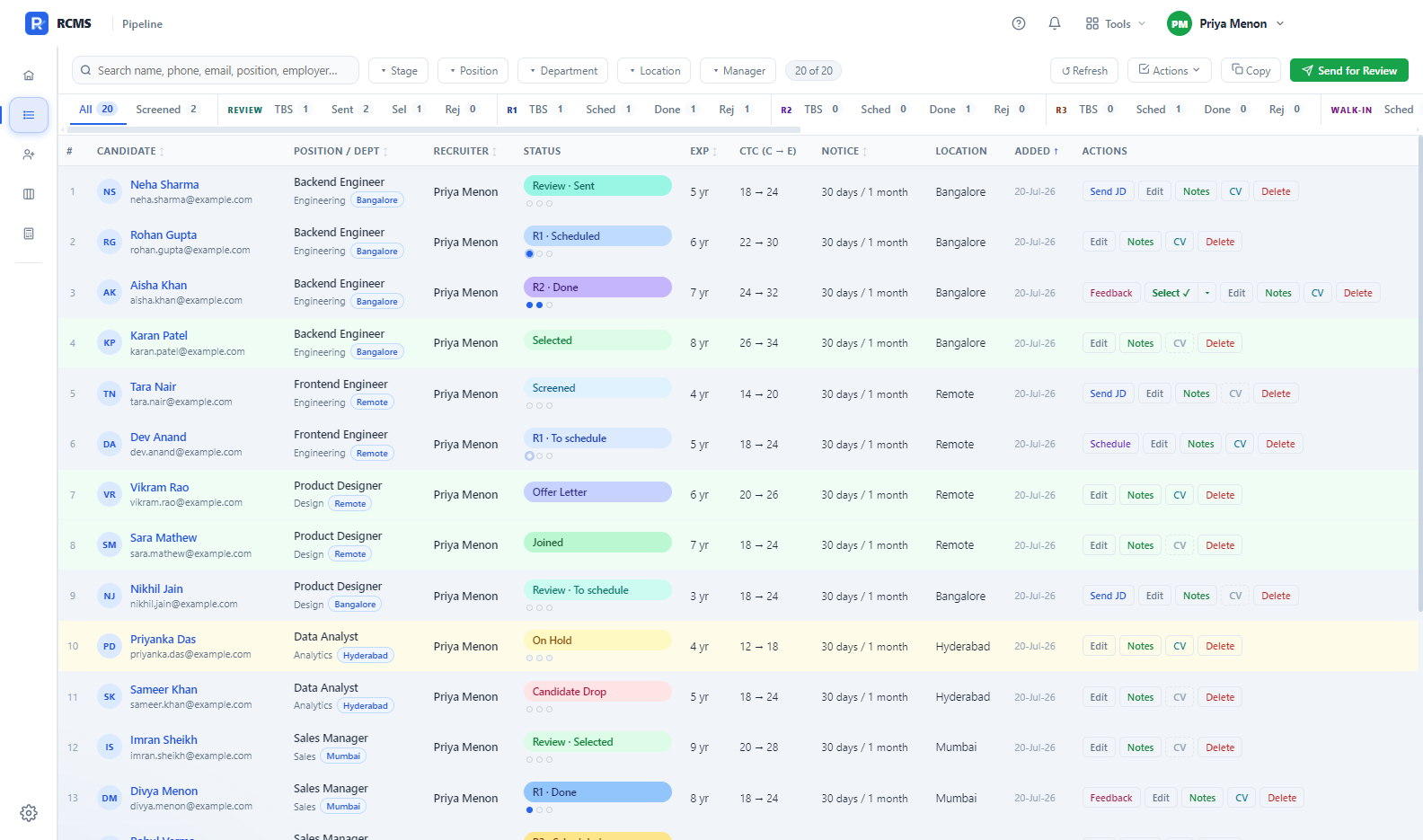
Thirty stages, from screened through three interview rounds to selected, offer, and joined. Rows are colour coded, so a selected candidate turns green and one on hold turns amber. You can see where everyone stands without opening a single row.

Filters that narrow each other

Pick a position and the department, location and manager lists narrow with it, offering only the values that role actually has. Widen it again and your earlier choices come back.

The same job, open twice

The same title in two cities, under two managers, at two budgets, is two different jobs. RCMS keeps them apart: the right JD, the right hiring manager, its own folder. Move a candidate from one to the other and their CV moves with them.

Interview panels

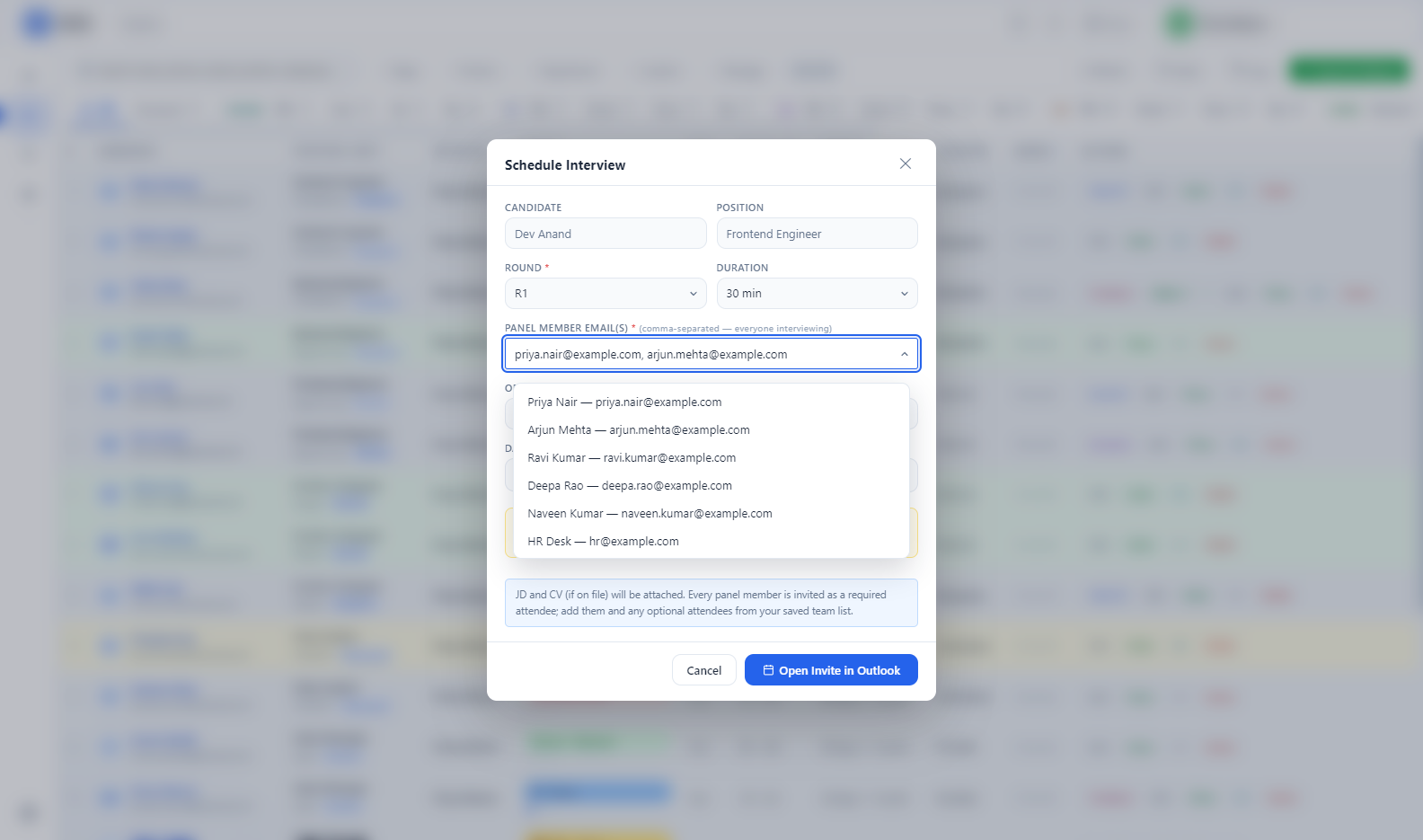
Add every interviewer to a round and they all land on the invite as required attendees, in Outlook or in the calendar file, with the JD and the CV already attached.

The repetitive email, done

Send a JD, book an interview, ask a panel for feedback, share a shortlist, request documents. One click each, filled in from the candidate and the role. Statuses move along by themselves as you act.

Your own, or your team’s

Work alone with nothing shared, or connect a team through one folder on OneDrive. Each recruiter’s pipeline stays private to their own PC; only the sign-in details are shared. You can start on your own and move to a team later.

Interviews that happen in a room

In person, not just on a call

Mark a round as in-person and pick the venue. The invite carries the address, the date, and a reporting time that can be earlier than the interview, so a site that wants people early can say so. It asks the candidate for their vehicle registration up front, because most offices will not lift a barrier without it. Save the venues you use and pick them from a list after that, or type a one-off address without saving it.

A walk-in drive, without thirty emails

One day, one venue, a lot of people. Tick the candidates you want, choose the date, the venue, the dress code, and who will be standing at the gate to meet them. Each person gets their own meeting invite, with their name on it and their CV attached, the venue as its location and the reporting time as its start, so it lands on their calendar and turns up on their phone. The invites open ready for you to read before any of them go, and nobody sees anyone else’s address.

When the day is over, mark each person selected or rejected from the same board. A rejected group is asked its reason once, before any mail opens, so changing your mind costs nothing. Then the letters go out as one send, ten addresses at a time and all of them in BCC, so a drive of thirty is three emails. Anyone whose email is missing is named on screen before you send: marked rejected, not quietly skipped.
The money, in your units.

fifteen currencies · nothing converted

Fifteen currencies, and no exchange rates

Pick yours in Settings and every salary, stipend and budget is labelled in it. A position can be Regular, Internship or Contract, and an internship asks for a monthly stipend instead of an annual figure, so 25,000 a month is entered and read as exactly that.

How a salary and a stipend are labelled under three of the fifteen currencies
CurrencyA salary readsA stipend reads
Rupee18 LPA₹25,000 / month
Dollar$90,000 / year$2,000 / month
Pound£65,000 / year£1,800 / month

=LABEL(amount, currency) · there is no CONVERT()

Changing the currency changes the label and never the number: a budget of 18 stays 18, and only the unit beside it moves. Those three rows are three different figures typed by three different people, not one figure converted. RCMS is offline, and a rate baked into an install is wrong inside a week, so it does not carry one. The Calculator below is its own thing, and works in lakhs per annum.

The hike, worked out under the field

Type what someone earns now and what they are asking for, and the percentage appears under the box, beside the budget for the role. It is the number the whole conversation turns on, and nobody has to hold it in their head any more.

A candidate on 12 lakhs per annum asking for 18
Current CTCyou type12 LPA
Expected CTCyou type18 LPA
RCMS says+50% on current

=(expected − current) ÷ current × 100

When there is nothing honest to divide by — no current figure, a zero, or “as per company norms” typed into the box — it says nothing at all rather than a confident nought. A figure below what someone earns now is flagged, because it is nearly always a typo.

Working out the offer.

lakhs per annum · copies into Excel

A hike, in the units you quote in

Type what someone is on now and the percentage you are thinking of. The revised figure and the increment follow as you type, in lakhs per annum, because that is how the conversation actually happens. Copy puts the revised figure on the clipboard as a plain number, with no unit to strip off again.

A sample hike: 10 lakhs per annum raised by 25 per cent
Currentyou type10 LPA
Hikeyou type25%
Revised12.5 LPA
Increment+2.5 LPA

=current + current × hike ÷ 100

A cut works the same way: type a negative percentage and the revised figure follows it down.

A full breakup, on your own pay policy

Set Basic as a share of CTC and HRA as a share of Basic, add PF, bonus and allowances, and leave one balancing row to fill whatever is left. Every row is worked out by the year and by the month. Gratuity and anything else that sits over and above CTC is kept above it, so the two totals stay honest. RCMS remembers your policy.

A sample CTC breakup at 10 lakhs per annum, on the default pay policy
ComponentRuleAnnualMonthly
Basic Salary40% of CTC4,00,00033,333
House Rent Allowance50% of Basic2,00,00016,667
Other AllowanceBalancing figure2,46,68020,557
Annual Bonus8.33% of Basic33,3202,777
PF (Company)12% of Basic1,20,00010,000
CTC10,00,00083,333
Gratuity4.81% of Basic, above CTC19,2401,603
Total CTC10,19,24084,937

The default policy, at 10 LPA. Every row is yours to change.

Two ways to run it

On your own

Takes about a minute. Choose “Just me”, type your name, and you are in. No shared folder, no sign-in, nothing leaves your PC. Turn on a PIN later if you want one.

Set it up →

With a team

One shared folder on OneDrive or SharePoint holds the team’s sign-in details, and nothing else. Everyone signs in with their own PIN. Each person’s candidates stay their own.

Set up a team →

What it looks like

captured from the app · everyone in it is invented
The RCMS pipeline: rows of candidates coloured by stage, with live counts for every stage across the top.

The pipeline. Colour is the status; you read it at a glance.

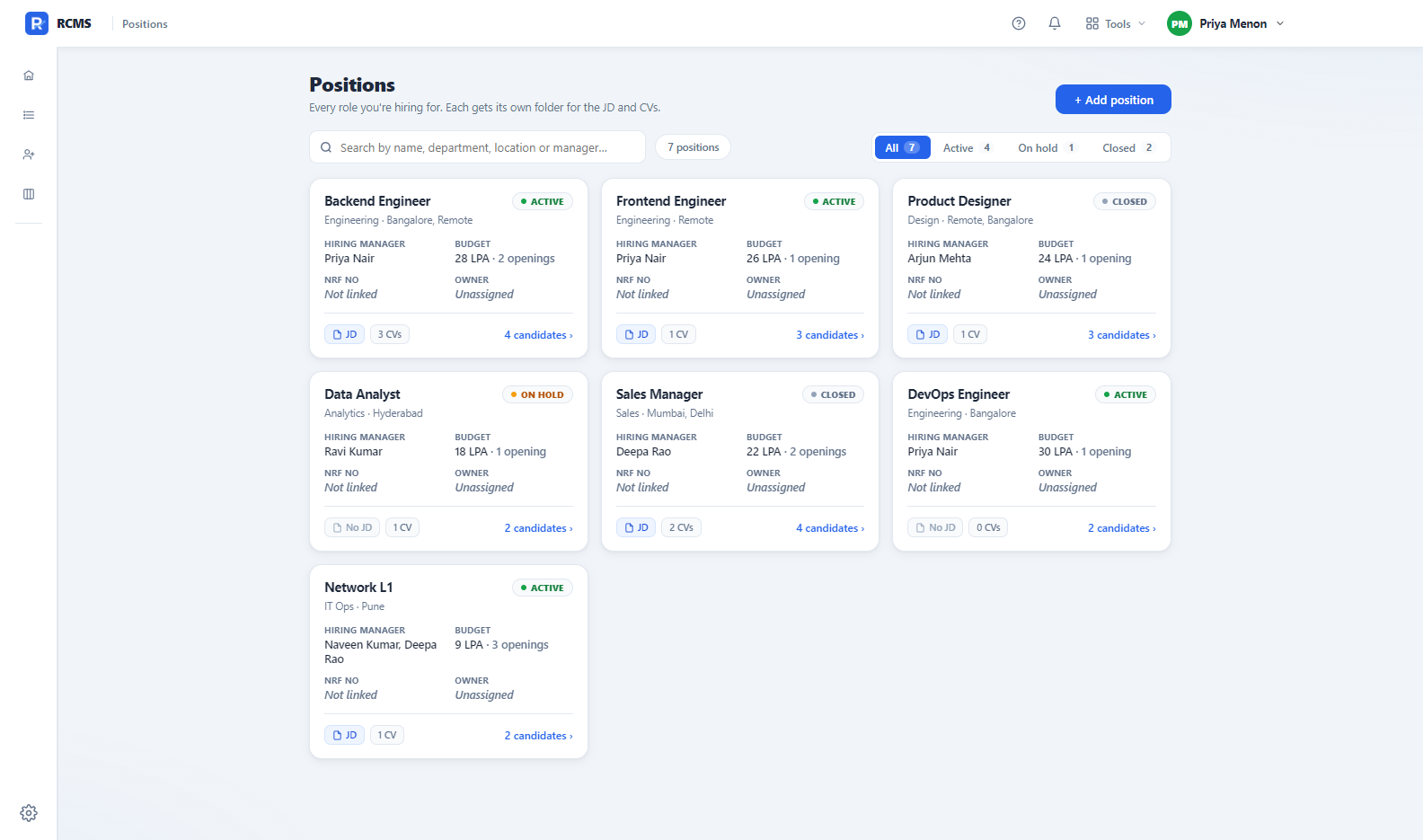
The positions view: a card for each open role showing status, hiring manager, budget, and chips for the JD and CVs on file.

Positions. A card per role, with its JD and CVs attached.

The scheduling panel: an interview round with several panellists, ready to send to Outlook as one invite.

A panel interview, scheduled straight into Outlook.

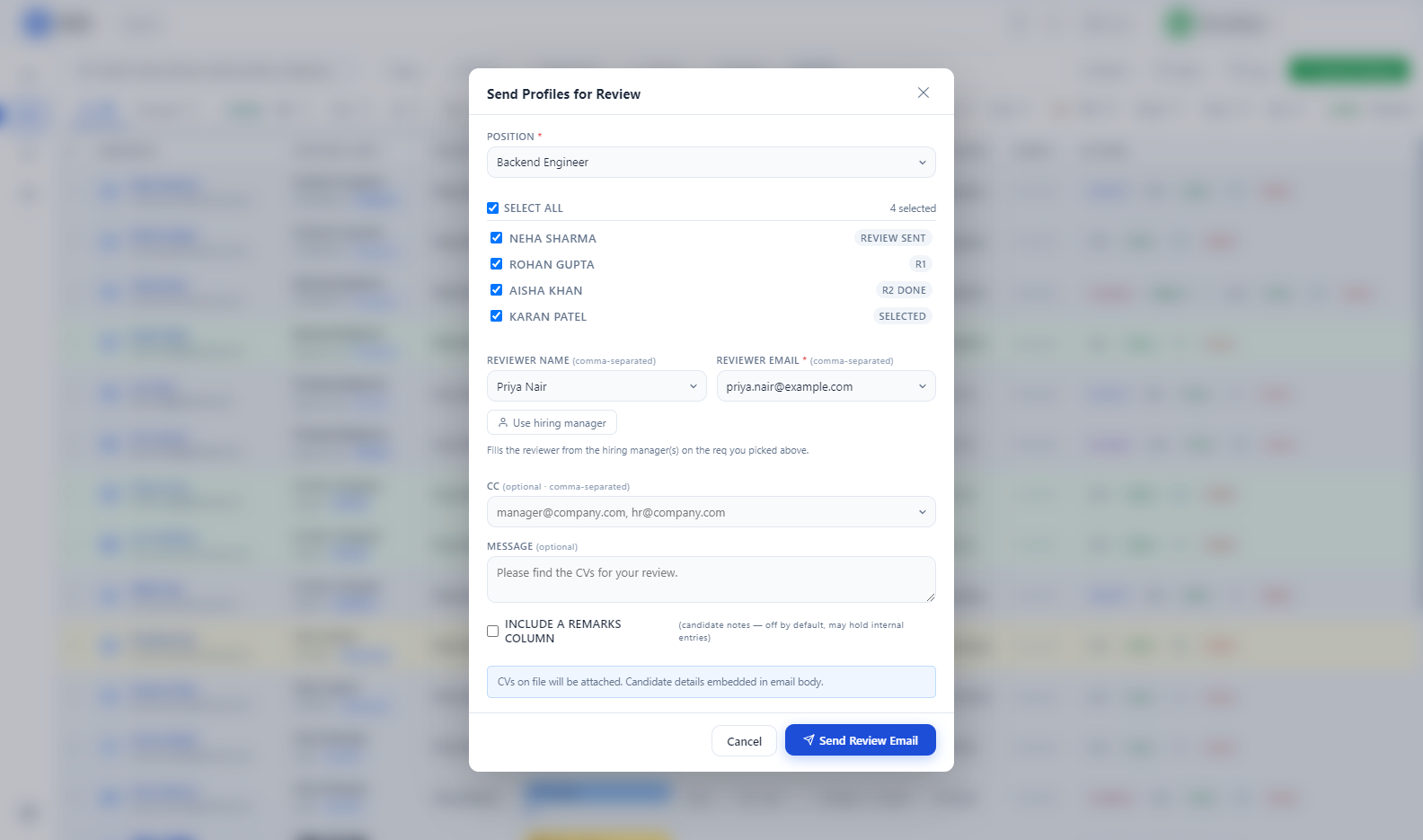
Send for review: a requisition and a shortlist of candidates selected, about to go out as a single email.

A shortlist sent for review: pick the people, one email.

Your leadership sheet, alive.

set up for your sheet · by hand

Most TA teams already keep one master hiring sheet. Every open role, every stage, every offer, every joiner. And every month someone spends two days turning it into slides.

RCMS reads that sheet and does it for you. Fulfilment against demand, time to fill, which roles are aging past sixty days, which recruiter is carrying the most open seats, and where your hires are actually coming from. It reads by column name, so adding or moving a column does not break it, and when you edit an opening from inside RCMS it writes back only the cells you changed. Your formulas and your layout survive.

Time to fill

47 days average

=AVERAGE(TAT days, active openings only) · target 45–60

AGING, ACTIVE OPENINGS

Active openings by age bucket
Labelopenings
0-30 days14
31-60 days12
61-90 days7
90+ days3

Recruiter load

Open requisitions only — a filled seat is not workload. A missing name is shown, not dropped, because a missing value is information.

=COUNT(reqs per recruiter WHERE status ∈ Open · Sourcing · IIP · OIP · Offered)

Open requisitions per recruiter
Labelopen requisitions
Priya9
Arjun7
Kavya6
(unassigned)2

Where candidates come from

From the controlled source picker, so every channel rolls up instead of vanishing into free text.

Candidates by source channel
Labelcandidates
LinkedIn112
Naukri84
Referral39
Instahyre21
Indeed17
Agency11
Internal6

Joining ratio

35%

=Joined ÷ (Joined + Offered) → 6 ÷ (6 + 11) ≈ 35%

Of the people who accepted an offer, how many actually turned up.

It is set up for your sheet, by hand.

Every organisation’s hiring sheet is laid out differently, so this is not something that switches itself on when you install RCMS. Send me yours and I will map it. It takes a conversation, not a project.

Email me your sheet — rcmsdevsupport@gmail.com

What it does not do.

  • Windows only. There is no Mac or web version.
  • It does not sync between people. By design. Your pipeline is on your PC; a teammate’s is on theirs. Only sign-in details are shared.
  • It is not a job board. It does not post adverts or receive applications. It picks up from the moment you have a candidate.
  • The leadership charts are not automatic. They read your own master hiring sheet, and every organisation lays theirs out differently, so I map it to yours by hand. Ask me and it is done.
  • There is no support team. There is one person, and their email is at the bottom of this page.